MARSH Manager
The marsh-mgr program is a graphical application for Linux and Windows that serves as the central node in the simulator architecture.
It is meant as a single tool to provide:
- Communicating data between simulator parts (nodes)
- Controlling the simulation execution and configuration
- Logging and replaying the simulation data

Installation
If your operating system or processor architecture do not have a release provided, you can build the application from source code using the developer documentation
Linux
Download the .AppImage file from the Releases page.
Make it executable, using the GUI, or with the following command:
chmod +x MARSH_Manager-x86_64.AppImage
If you haven't used AppImage files before you might need to install the FUSE library. The command below was tested to work on Ubuntu 22.04, if you still have problems, see AppImage documentation about FUSE.
sudo apt install libfuse2
Run the program using GUI, or from terminal:
./MARSH_Manager-x86_64.AppImage
Optional: register as marsh-mgr command
It is recommended to put your own executables in ~/.local/bin
mkdir -p ~/.local/bin
cp ./MARSH_Manager-x86_64.AppImage ~/.local/bin/marsh-mgr
If the command marsh-mgr is still not found at this point, this directory isn't in PATH variable, where system looks for executables (you can display it with echo $PATH).
An example fix for users of bash (default shell in Ubuntu):
echo 'export PATH=~/.local/bin:$PATH' >> ~/.bashrc
source ~/.bashrc
Windows
Download and unpack the ZIP file for Windows from the Releases page.
Run marsh-mgr.exe.
Note
This is a temporary solution, expect some changes.
Usage
Start the application executable, dependent on your operating system may be the marsh-mgr command.
If other nodes are running on different computers, configure "manager address" to IP address of the computer running the manager.
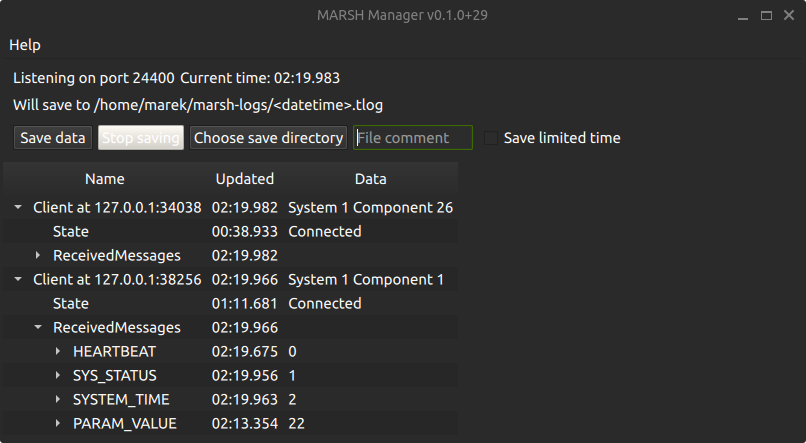
Saving data
The user can choose a folder to save the data, the files are named depending on the logging start time to avoid overwriting previous saves. A "file comment" can be added which will be a part of the generated filename, but will also be saved as a STATUSTEXT message at the start of the file. The maximum length for file comment is 50 characters.
Tip
You can use the file comment to help with your data processing afterwards: write test subject initials, short description of test case etc.
The data files saved are "MAVLink telemetry log", recognizable by .tlog extension.
This binary file format is a de facto standard between multiple UAV flight stacks, the file just contains MAVLink messages, each preceded by a timestamp in microseconds.
Consult pages in "Data analysis" section on the left for examples of reading these log files.
There are also multiple external tools available for viewing the logs, notable examples:
- pymavlink library which is used for generating libraries and communication for Python also has
mavlogdump.pyscript - Some online tools like UAV Log Viewer can read
.tlogfiles. - ArduPilot's MAVExplorer can be used for plots, filtering data and showing it on a map
Replaying data
Saved .tlog files can be replayed through the manager, so that the visualisation can be shown again without running the rest of the simulator.
This feature is available since version 0.3.0.
- Click "Select replay file" and choose a
.tlogfile, the dialog opens in themarsh-logsfolder in your home directory by default. The file name is displayed together with its duration. - Start only the visualisation node(s) that should display the replay.
- Click "Start replay" once the message "Ready to start replay" is shown.
The recorded messages are broadcast to the connected nodes with the original timing between them.
The replay can only be started when all the conditions below are met, otherwise a warning is displayed in place of the ready message:
- A replay file is selected.
- Data is not being saved, stop the recording first. Likewise, saving data cannot be started during a replay.
- At least one node of type VISUALIZATION is connected, and no nodes of other types are (they would receive the replayed messages mixed with their own data).
During the replay the following controls are available:
- "Pause" and "Resume" to temporarily stop the replay.
- "Stop replay" to end it early, a dialog is shown when the replay reaches the end of the file.
- Speed spin box, accepting any value from 0.1x to 10.0x in steps of 0.01x. It can be changed before the start of the replay, or while it is paused.
- The progress bar shows the current and total time, clicking on it jumps to that position in the file.
Roadmap
The following are already planned future features of MARSH Manager, approximately in the order of priority / expected implementation date:
- Emit parameters to log for nodes with MARSH_MODE_SINGLE_MESSAGE
- Distribution:
- Automated builds and releases on GitHub
- Windows package (with
windeployqt)
- Connecting nodes on serial port
- Graph visualisation, considering these candidate solutions:
- NASA OpenMCT or Grafana
- Expect updates over WebSocket, see mavlink2rest
- In-app with Qt Charts
- NASA OpenMCT or Grafana
- Using full message definitions:
- Displaying units of message fields
- Displaying angular values sent as radians also as degrees
- Showing text identifiers for enum values
- Find length of common prefix from enum names
- Show bitfields as a collection of flags
- Maybe later: using tooltips to show descriptions for message fields and enum constants
- Displaying units of message fields
- Extend support for Parameter Protocol:
- Setting parameters of multiple components based on test matrix
- Parameter descriptions with Component Metadata Protocol
- Console showing STATUSTEXT messages
- Resolving duplicate component ids
Contributing
Contributions to documentation and code are welcome. The repository is on GitHub as marsh-sim/marsh-manager. If you notice a problem, or want to request a new feature, you can create a new issue Code contributions are expected as Pull Requests to that repository. See the developer documentation to get started.
Licenses
The code for MARSH Manager is licensed under GNU General Public License v3.0.
General application structure provided by Qt Framework under terms of the GNU Lesser General Public License (LGPL).
Communication between components with MAVLink using generated code under MIT License.